
Your website, in one organised ZIP.
You receive more than a link. On completion and payment, you receive the agreed files, code and instructions, giving you your own copy of the website.
Delivery is the result of organised teamwork, from understanding the need to implementation and review. Code and documentation provide a foundation for continuing and expanding your project.

What a ZIP is, in plain language
It is a compressed package that gathers multiple files into one transferable file. The website still consists of organised pages, images and code. The ZIP keeps them together for straightforward delivery and storage.
ZIP is the packaging format. The practical benefits come from receiving complete, ready to use static website files and instructions.
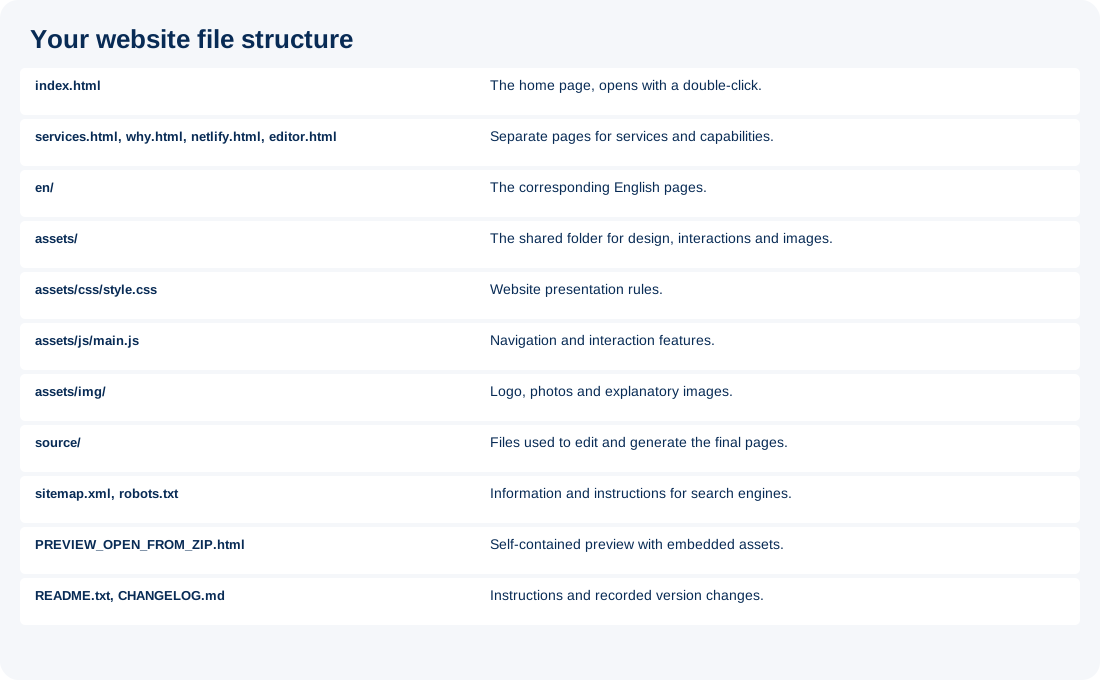
What the delivery includes
- The agreed pages, with Greek and English where included in the project.
- HTML (page structure code) code for content, CSS (presentation rules) for presentation and JavaScript (browser interaction code) for browser interactions.
- The logo, images and necessary local files included in the agreed project.
- SEO settings and files, such as titles, descriptions, a sitemap (page list for search engines) and robots (instructions for search engines) file, according to project requirements.
- Opening and publishing instructions, a version number and a history of recorded changes.
Delivery includes the Webanelixis.com Editor with the configuration defined for your project. Additional services, such as Local SEO (local visibility in search) or specialised integrations, are included when agreed and implemented. We handle technical preparation and guide you through use.
Practical benefits
Your own copy
Store the delivered version on your computer and in a second safe location. You do not rely solely on an online link.
Choice of partner and hosting
A suitable partner can edit the files. The static website can move to compatible hosting, after checking settings and any external services.
Clear versions
Each delivery has a version number and recorded changes. Keeping previous ZIP files shows what you received at each stage. Delivery history is different from a detailed Git version control system.
How to open and publish it
- Download the ZIP and choose Extract All, keeping the folders and files together.
- Double click index.html to view local pages, navigation and presentation. The delivered local preview does not require installing a server.
- For publishing on Netlify, use the ready to publish ZIP or folder according to the delivery instructions. The account and domain are yours.
What needs separate planning
We handle connection and activation of the online forms and external services included in our agreement. If accounts, a domain (your website address), email, data or subscriptions need to be transferred, we organise that process as agreed too. You do not need to learn code or configure technical settings. We explain clearly what information or approvals we need from you.
Editing code requires relevant skills or an appropriate tool. Code delivered by a public website to the browser is visible to visitors and must not contain secret credentials. Usage rights for images, fonts and third party assets follow the agreement and their licences.
Sources and technical documentation
MDN (Mozilla’s technical documentation) explains static website structure and publishing its files. Netlify documents manual publishing and downloading deployed files. The Webanelixis.com provisions above describe our own delivery process. Sources checked, 15 October 2026.
Discuss what your website needs