
Hosting & HTTPS
Global CDN, a netlify.app address and connection of your own domain with SSL. Domain registration and renewal cost extra.
Why we recommend Netlify for the static websites we deliver as ZIP files: straightforward publishing, secure connections and the option to start for free.
Our team selects and organises hosting after understanding the project’s needs. We integrate Netlify into the complete solution and plan appropriate expansion as requirements grow.

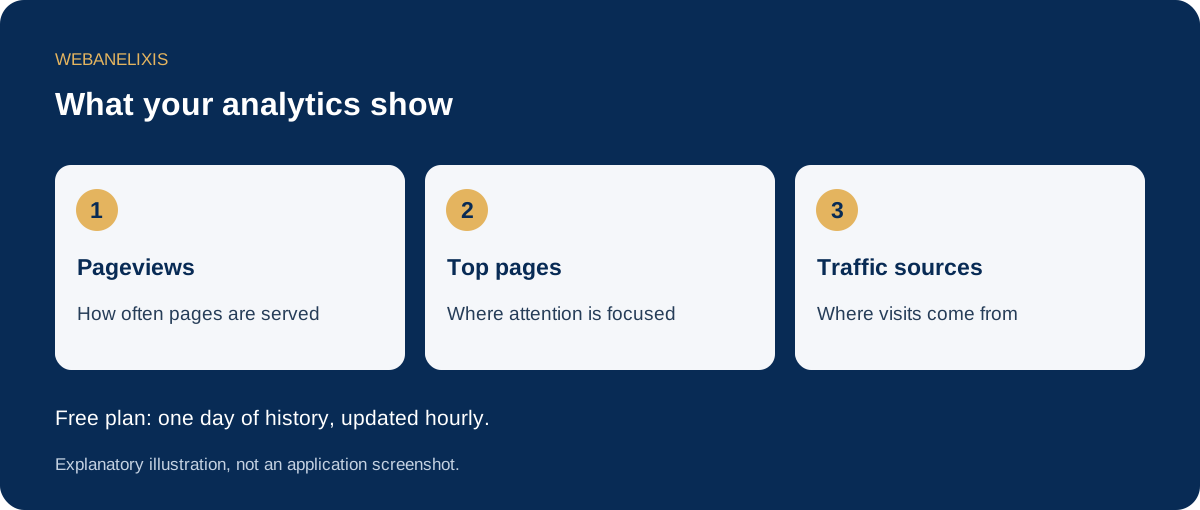
It hosts website files and delivers them to visitors through a global CDN. Our ready to publish HTML (page structure code), CSS (presentation rules), JavaScript (browser interaction code) and images do not require a WordPress installation or server administration.
Our choice is based on straightforward website delivery and updates. The ZIP contains the code and files we deliver, so you can keep a copy and move the static website to another compatible provider.
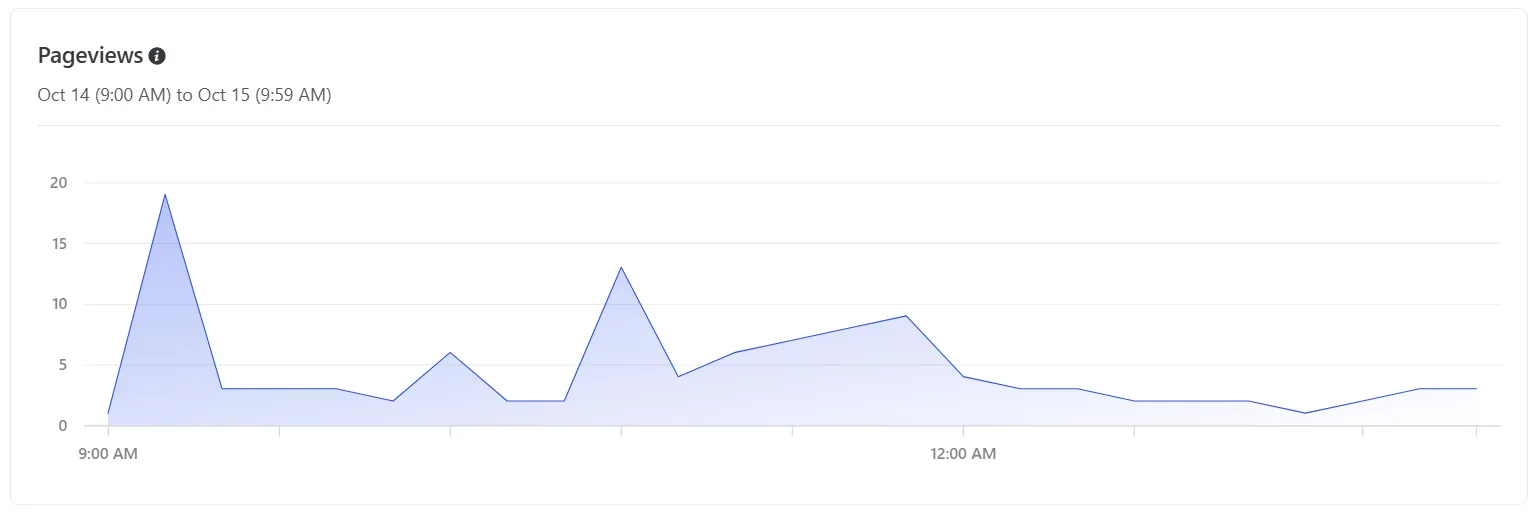
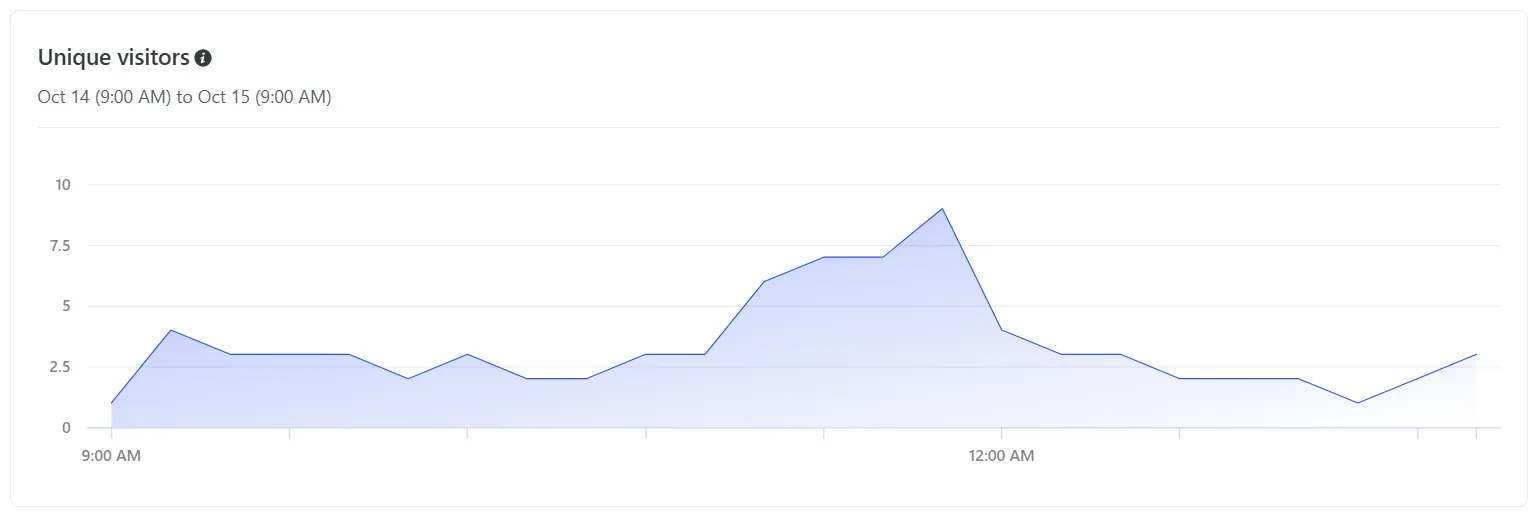
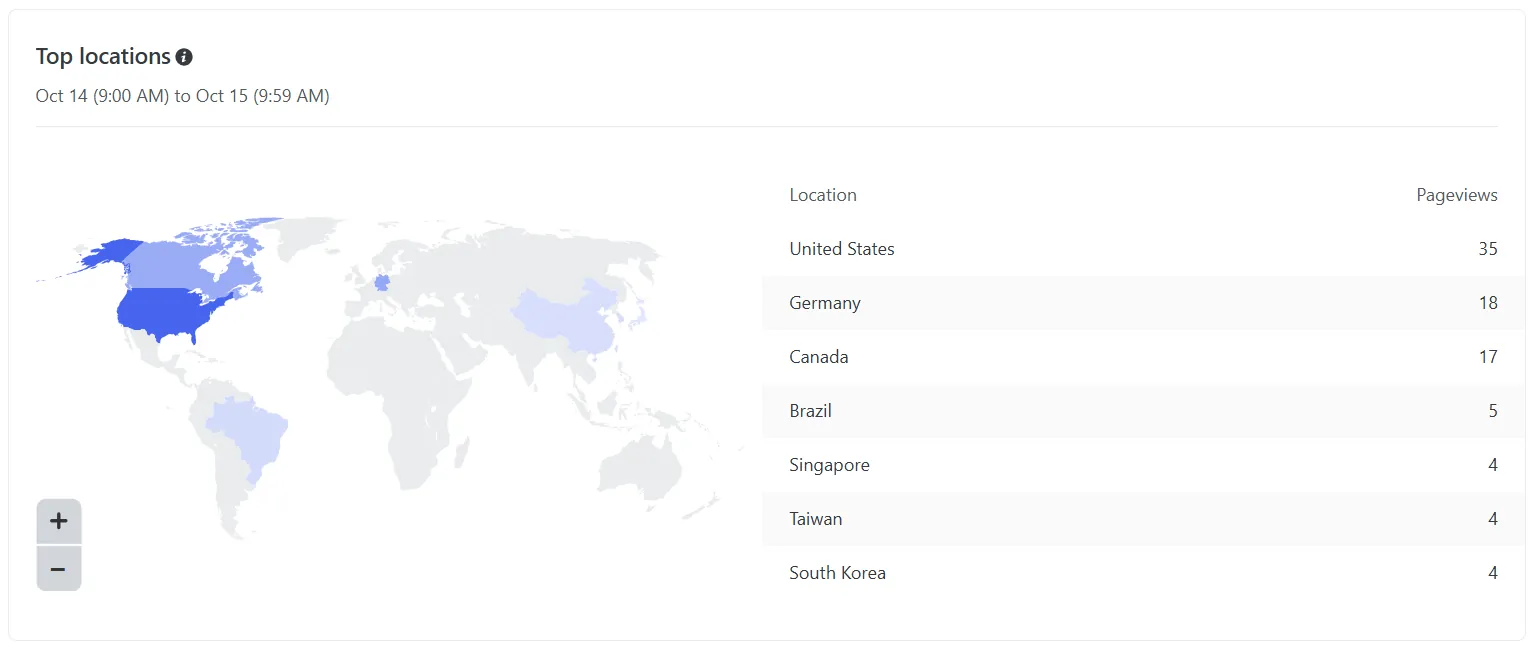
Netlify Drop ↗Real screenshots from a PV5 website, divided into sections for clearer reading. The displayed figures are examples from a specific period. Select an image to open it in full.

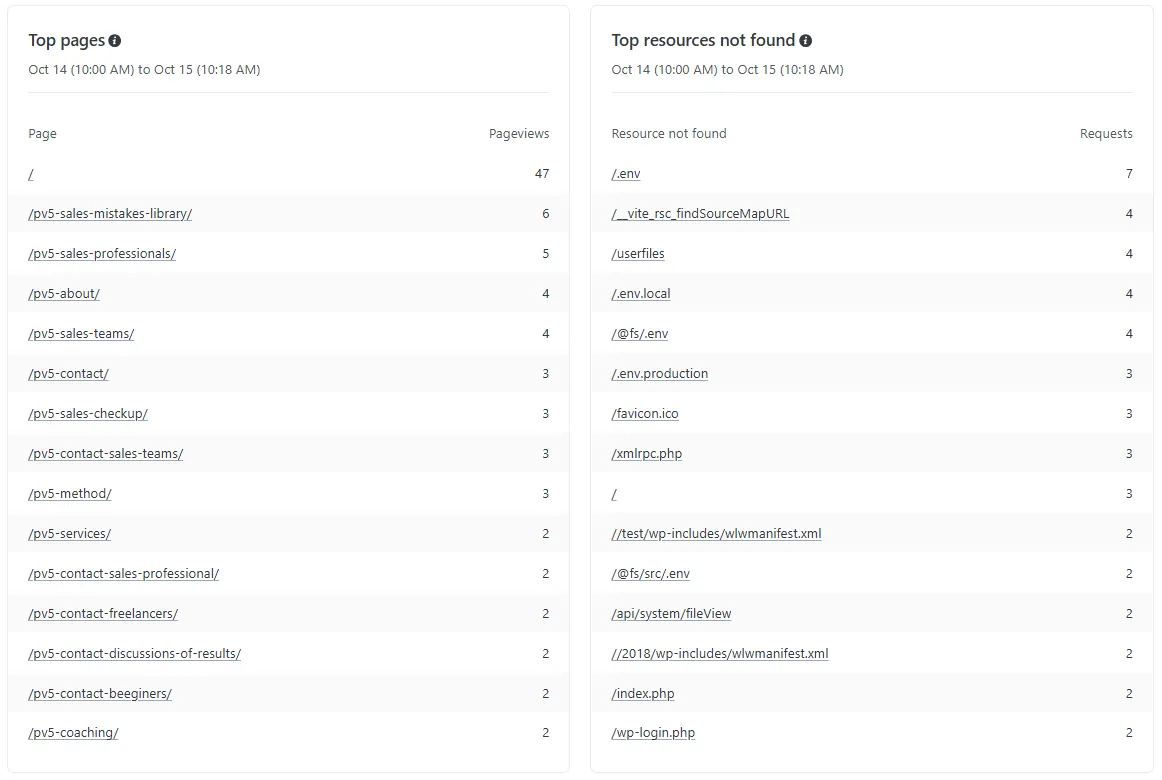
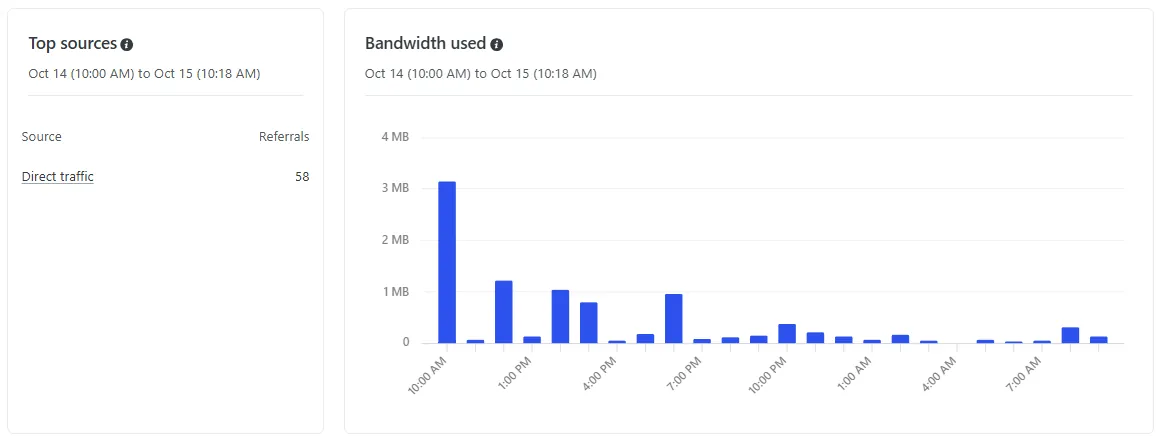
Free allows up to 500 projects per team, with one owner. Each site has its own content and address. However, monthly credits are shared by all projects in the team, each site or email address does not receive its own separate 300 credits.
Free plan & limits ↗Global CDN, a netlify.app address and connection of your own domain with SSL. Domain registration and renewal cost extra.
Unlimited Deploy Previews. Preview deployments do not use publishing credits; traffic and any compute services remain metered.
Free Netlify Forms submissions on credit based plans. Functions and storage are also available, with usage that may consume credits. These features require the relevant setup.
Basic firewall rules and rate limiting, usage monitoring and consumption alerts. Free includes one day of Observability history.
Free includes Web Analytics with one day of history. You can see pageviews, unique visitors, locations, traffic sources and the most popular pages by URL, as well as resources returning 404 errors.
We enable Web Analytics (website traffic statistics) for each agreed project (a separate website in your account) and show you where to view them. Data comes from CDN logs (request records from the global content delivery network), without additional JavaScript (browser interaction code) or analytics cookies on your pages. Free plan history is one day.
Web Analytics ↗ · How analytics works ↗ · Retention by plan ↗
From a computer, phone or tablet, sign in to Netlify through a browser, select the website and open Analytics & metrics, then Analytics. You need an internet connection and account access. No dedicated app installation is required. Some tables may need horizontal scrolling on a small screen.
Metrics update hourly. For example, more views on a service page show where attention is concentrated. If a missing address appears frequently, we can investigate. The figures help decisions but do not by themselves show how many visitors became customers.
Free includes HTTPS/SSL (an encrypted connection between visitor and website), automatic network protection against DDoS (large volumes of requests intended to overwhelm a service), basic Firewall Traffic Rules (rules allowing or blocking traffic) and basic rate limiting (limits on request frequency).
Rules can target an IP address (connection address) or geographic area, within plan limits. Not set means that a particular rule has not been configured. Seeing the Security tab does not mean every available option is active or free.
These are real hosting protection layers, rather than a guarantee of complete security. Free does not include an Enterprise contractual uptime guarantee. Advanced tools such as WAF (a specialised application attack filter) must be checked separately for plan availability and charges.
We handle assessment and the agreed configuration of the website, forms and service connections. Protection also includes appropriate code and secure account access. You do not need to configure technical rules yourself.
Netlify, access protection ↗ · Firewall Traffic Rules ↗ · Features by plan ↗
Manual publishing does not require a Git connection. Netlify keeps deployment history and allows you to return to an available previous successful deployment.
Deploy management ↗On the new Free plan, credits reset at the start of each monthly cycle and unused credits do not carry over. Official rates are 15 credits per successful production deployment, 20 per GB of bandwidth and 2 per 10,000 web requests.
Up to 20 publications per month is therefore the theoretical limit only if all credits are spent on publishing. Actual capacity also depends on traffic and other services.
4 publications + 5 GB + 100,000 requests = 180 credits. This leaves 120 of the 300 credits.
10 publications + 8 GB + 100,000 requests = 330 credits. This estimate exceeds the free allowance.
Illustrative calculations excluding compute or AI. When the Netlify dashboard shows operation on operational credits, already published sites remain online, while new production deployments and Agent Runners are paused. This remaining balance is reserved for keeping sites online and cannot be used for a new upload. New publications require the next monthly cycle or an upgrade.
This distinction was confirmed by a Netlify dashboard message on 14 October 2026. Pausing new publications does not by itself mean that sites are offline. Public documentation separately states that sites are paused when the total credit balance is completely exhausted.
Official credit rules ↗300 credits. A fixed free allowance, without automatic purchases of additional credits.
1,000 credits. Additional credit purchases and optional automatic balance top ups.
From 3,000 credits and team collaboration capabilities, with further expansion options.
Prices are in USD. Automatic credit purchases on paid plans are initially disabled. Older accounts may remain on legacy plans: always check your plan and usage in your own Netlify dashboard.
Current pricing ↗For a business website, we consider Netlify a practical choice: direct ZIP upload, HTTPS, CDN, updates and metrics in the same dashboard. The free plan can cover limited usage, provided the balance is monitored.
Alternatives exist: Cloudflare Pages also supports ZIP through Direct Upload. Provider choice depends on requirements, limits and the update process. Netlify does not directly host a complete WordPress installation with PHP and a database.
Cloudflare Direct Upload ↗Netlify reports recognition as a Visionary in the 2024 Gartner Magic Quadrant for Cloud Application Platforms. This is a specific assessment from that year, not proof that it is the best choice for every website.
Gartner recognition · 2024 ↗Official sources checked: 14 October 2026. Each section links to provider documentation. Features, limits and prices may change. Describing these capabilities does not mean they have already been enabled in your account.
Discuss your hosting with us